
Compare
Estimating software or Excel: Stralos or spreadsheets
A spreadsheet suits a handful of small jobs priced from rates you carry in your head. It stops being the right tool on the tender with a client’s schedule, a few hundred metres of pipe in the ground, and two weeks to close.
Where does a spreadsheet break on a civil tender?
Three places, on one job. This is an example job and an example company: Riverbend Stage 3 Subdivision, 28 lots of civil works, priced by Kesterton Civil Ltd.
-
The rate you type twice.
Item 3.01 is 220 m of DN300 RCRRJ Class 4 stormwater. Stralos works the rate out at NZ$439.96 a metre. Typed across into the client’s schedule as NZ$349.96, the line goes in at NZ$76,991.20 when it should be NZ$96,791.20. That’s NZ$19,800 short on one line, and the total at the bottom still looks like a total.
In Stralos the rate on the client’s line is the rate you worked out. Nobody types it across.
-
The trench sheet.
The schedule says 220 m of DN300. It doesn’t give you the trench. For the 180 m in the carriageway, at 0.75 m wide and averaging 1.05 m deep from subgrade, that’s 141.75 m³ out of the ground and 163.01 m³ once it’s loose on the truck. Many firms have a trench spreadsheet that works this out, and one person who understands it.
Trench is one of Stralos’s material and structure calculators, linked to your takeoff and pricing, alongside Pit / Structures and Volume, with more being added. It takes its length from the takeoff, gives each layer of ground its own bulking, nets the pipe or structure out of the bedding, haunch and surround, and works out what goes back in and what’s carted away. Change the depth and the quantities and the price follow.
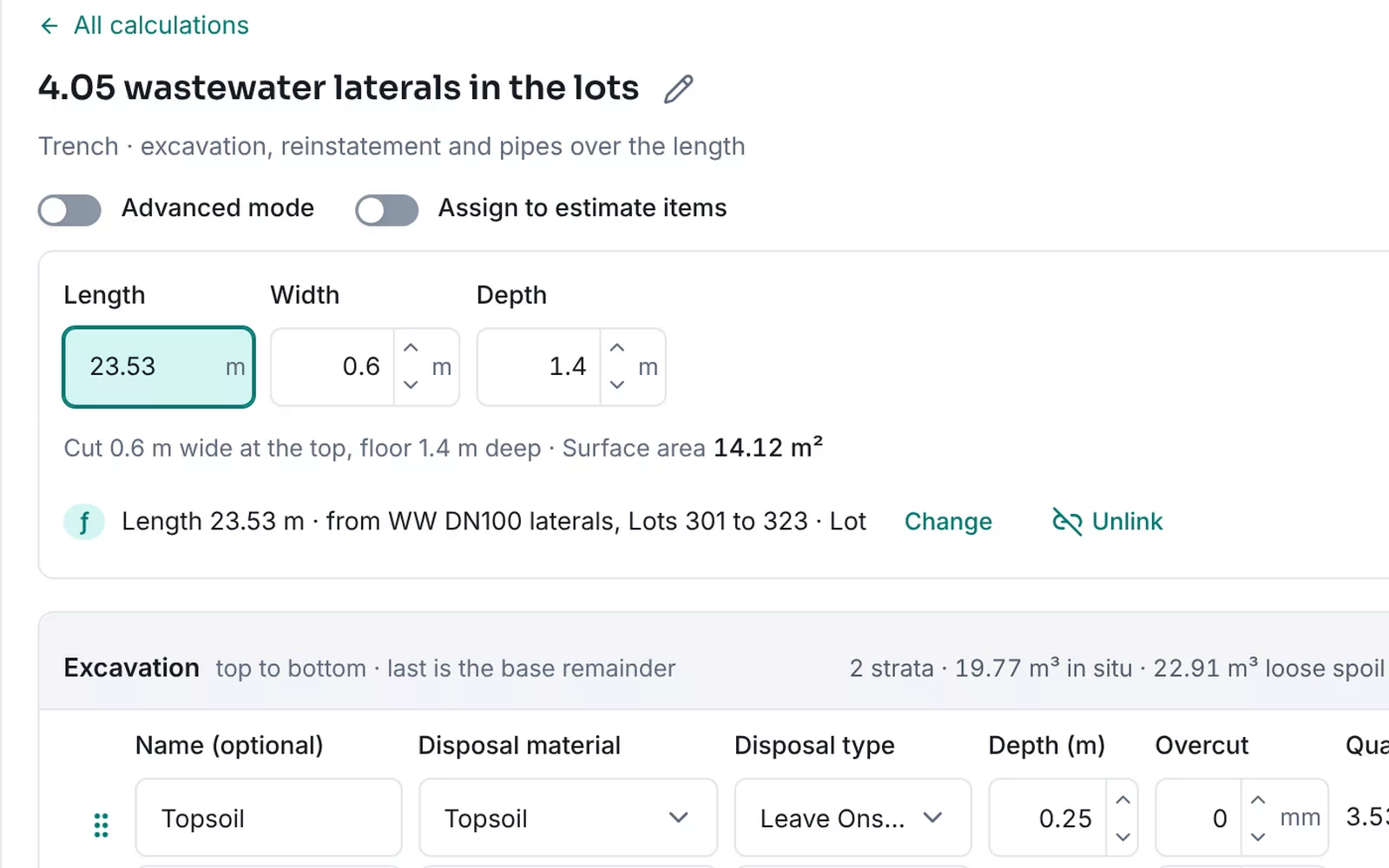
Recorded in Stralos: the trench set up once, then turned in 3D. -
The client’s schedule.
It arrives as their Excel with their numbering. In a spreadsheet you copy 50 lines into your own workbook to price them, copy your rates back, then check you didn’t skip a row.
Stralos brings their schedule in with the numbering kept, so 3.01 stays 3.01, and locks it. What you measured sits beside what they scheduled. On this job that’s how item 3.07 shows up: 201 m scheduled against 223.7 m measured, which is 22.7 m to query before questions close. Then your rates are written back into their own workbook. This part is on the Standard plan.
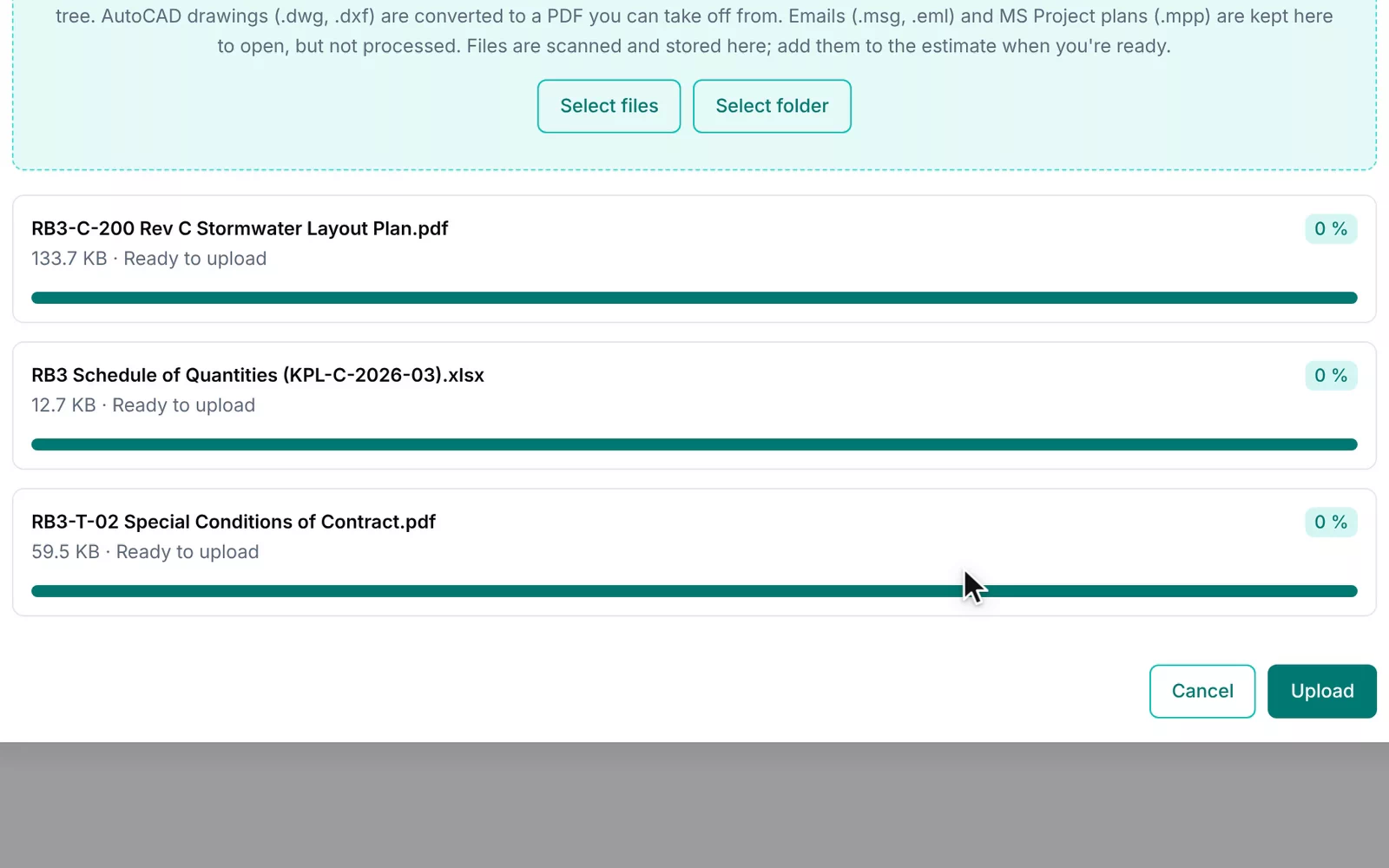
Recorded in Stralos: the client’s schedule suggested from the tender pack, row 3.01 kept at 220 m. 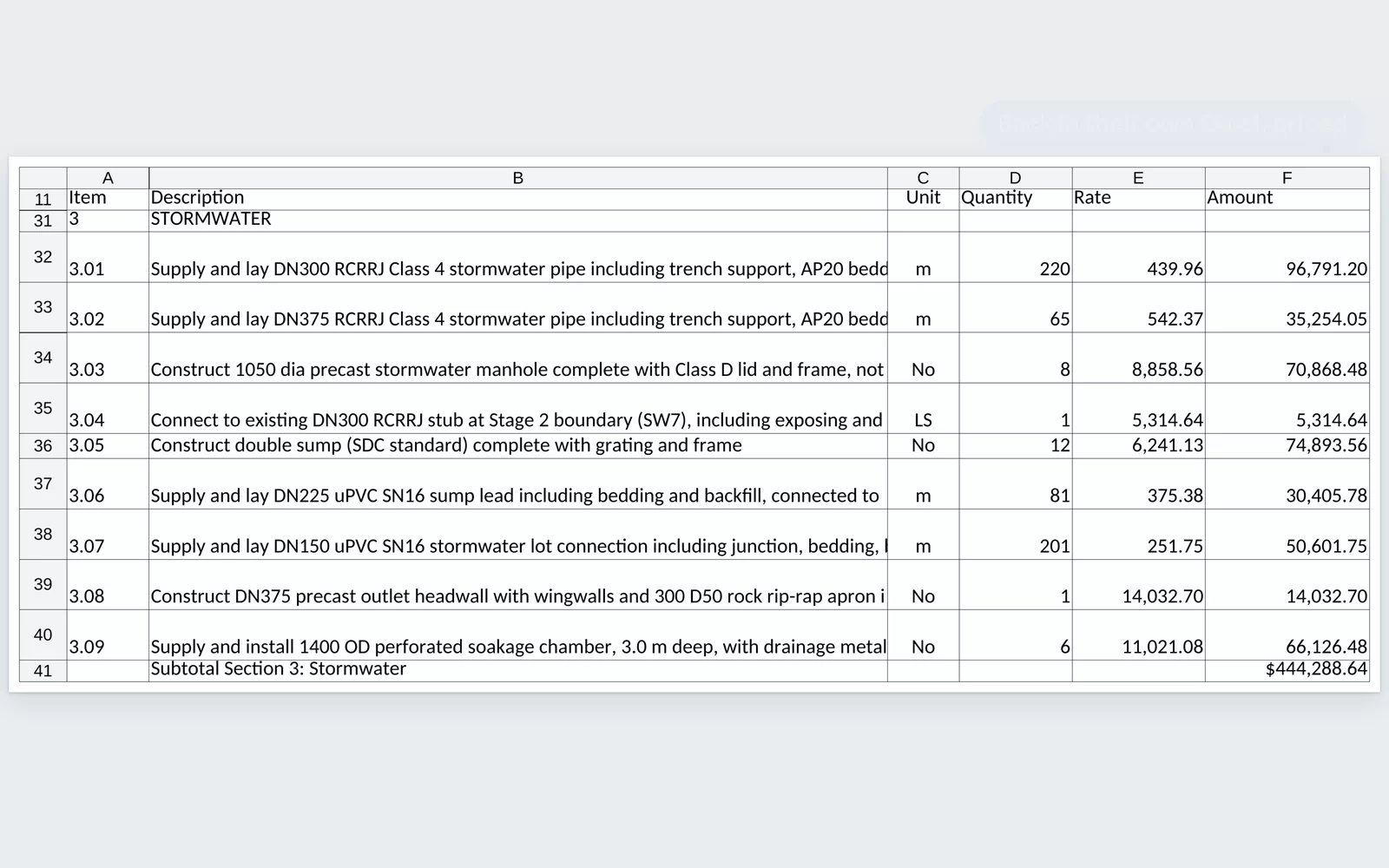
Recorded in Stralos: the client’s own workbook, section 3 priced.
A spreadsheet also doesn’t read the special conditions for you. On the Standard plan, Stralos’s Tender review reads the tender documents and drawings against your estimate. Findings from the documents quote the page they came from. You decide what to do with each one, and it never changes your estimate.
What does Stralos cost beside Excel?
| Price | Charged per | |
|---|---|---|
| Excel, with Microsoft 365 Apps for business | NZ$19.20 a month + GST, paid yearlySource for Microsoft 365 Apps for business | User |
| Stralos Lite (quotes and estimates, up to 10 priced lines a quote, no tendering) | NZ$99 a month + GST | User |
| Stralos Standard | NZ$199 a month + GST | User |
Microsoft’s price is from its New Zealand plans and pricing page, read on 12 November 2026.
In the example above, one retyped rate was NZ$19,800 on one line of one tender. In Stralos the rate on the client’s line is the rate you worked out, so there is nothing to retype.
What does moving from Excel take?
Your rates come across, and your formulas become rates worked out from crew, plant and materials.
- Your library holds your own rates and your suppliers’ price lists. The first job is bringing them in.
- Labour and plant rates go in once and are reused on every job.
- Supplier price lists come in from Excel, CSV or PDF. Stralos matches each line to your rate library and you check each match before anything changes.
- Or ask us. We’ll load your price list into your rate library for you.
- Your formulas become worked-out rates. A rate that lives in your workbook as cell formulas is set up once in Stralos: the crew, the plant, the materials and the production rate, in whatever unit the work is priced in. It’s the point where the production rate stops hiding in a formula nobody checks.
Load your rates first, then price your next job both ways and see which answer you trust. Starter is free for one person, with no card.
What can you still do in Excel afterwards?
Most of what your clients expect.
- The client’s workbook goes back as their workbook. Your rates are written into their own .xlsx or .xlsm file with the numbering untouched. A row it wasn’t sure of is listed on a Please check sheet, and split items roll back into their parent’s row. Standard plan.
- Your tender downloads as Excel, as well as PDF and Word, with or without the breakdown. Standard plan.
- Price lists keep arriving in Excel or CSV and keep going in the same way.
- Your own spreadsheets keep working alongside it.
If you stop using Stralos, tenders download as PDF, Excel or Word, and the client’s schedule exports back into their own workbook.
Which should you choose?
Choose Stralos if clients send you a schedule to price, you measure off drawings, more than one person touches the estimate, or the trench sheet has one owner and they’re on leave the week the tender closes.
Stay on spreadsheets if you price a handful of small jobs a year, one person does all of it, your clients don’t send schedules, and you’ve never had to explain a number you couldn’t trace.
Not sure? Price your next tender both ways. It costs nothing on Starter.
Questions
Can I bring my estimating spreadsheet across?
Your supplier price lists come in from Excel, CSV or PDF, and the client’s schedule is read from the tender pack. Rates you’ve built as formulas in your own workbook are set up once from their crew, plant and materials, so each one shows its crew, plant, materials and production rate.
Does Stralos work with the client’s Excel schedule?
Yes, on the Standard plan. Their schedule comes in with its numbering locked, and your rates are exported back into their own workbook. A row it wasn’t sure of is listed on a Please check sheet. Split items roll back into their parent’s row.
How long does it take to move from Excel?
Load a supplier price list and your labour and plant rates, and you can price your first item. After that it depends on how many rates you set up that way. Ask us and we’ll load your price list into your rate library for you.
I’m an owner-operator. Which plan suits me?
Start on Starter: it’s free for one person, with everything in Standard and up to 5 active projects at a time. If you need more jobs and you’re pricing schedules and measuring drawings, one Standard seat is enough to price every tender you do. If your work is quotes and estimates, Lite is NZ$99 a month + GST, for quotes of up to 10 priced lines, without tendering.
Can I go back to Excel if it doesn’t suit?
Yes. Cancel at any time, in the app or by getting in touch. Your tenders download as PDF, Excel or Word, and the client’s schedule exports back into their own workbook. A monthly plan runs to the end of the month you’ve paid for and the rest of that month isn’t refunded.
Start free on your next tender
Set up your company in a few minutes and price a real job on Starter, with no card and no time limit.
Free on Starter: everything in Standard for one person, with up to 5 active projects and 2 AI reviews a month. No card. When you add people or go past 5 active projects, Standard is NZ$199 per user per month + GST. Lite, for quotes, is NZ$99 + GST.