
Features

Material and structure calculators linked to your takeoff and pricing

Stralos has three calculators for work in the ground, with more being added: Trench, Pit / Structures and Volume. Each can take its length or area from your takeoff, works out what comes out, what goes back, what you buy in and what gets carted away, in m³ and tonnes, and sends each layer to the item’s price as its own line.

On every plan, including free Starter. Lite NZ$99 or Standard NZ$199, per user a month + GST.

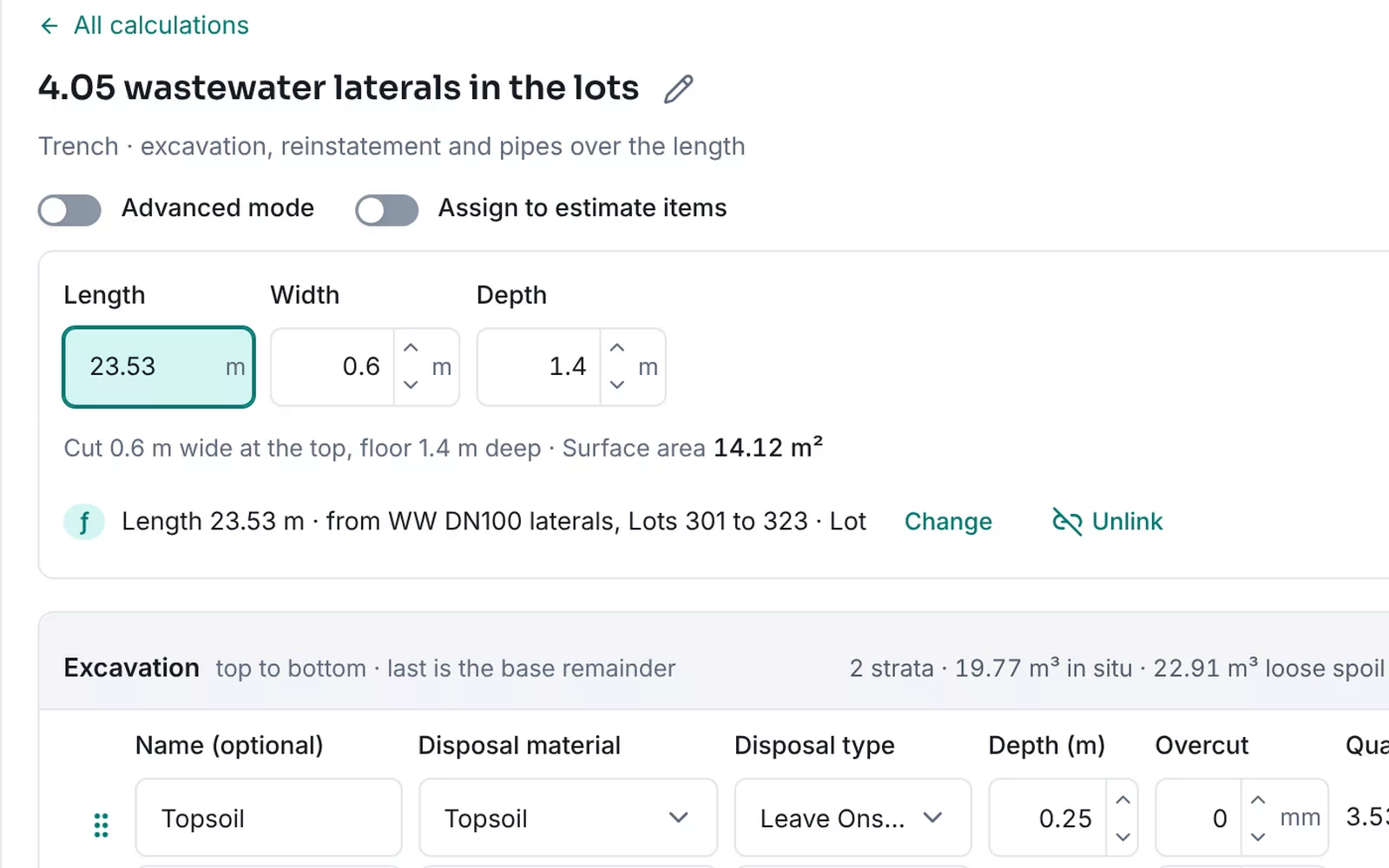
Recorded in Stralos: the 4.05 lateral trench in the lots, topsoil and gravel reused and the surplus carted, then the trench turned in 3D. Example job and company.

Which calculators does Stralos have?

Three today, with more being added. Each one describes the dig as layers of ground, each with its own bulking, and layers of reinstatement from the floor up. Trench is for pipe trenches, Pit / Structures for the hole around manholes and chambers, and Volume for strips, pads and bulk digs.

  • Pit / Structures digs a rectangular or circular hole around one or more structures: boxes, or vertical or horizontal cylinders. New structures displace the backfill, so you’re not buying metal for the space a manhole fills. Existing ones come off the dig and the cart-away too.
  • Volume takes length by width by depth, or an area and a depth. Riverbend’s topsoil strip is 5,440 m² at 0.25 m, so 1,360 m³.
  • Save a calculation to your company’s Calculator Library and anyone can start the next job from it.
  • Turn any of the three in 3D: drag to turn, scroll or pinch to zoom.
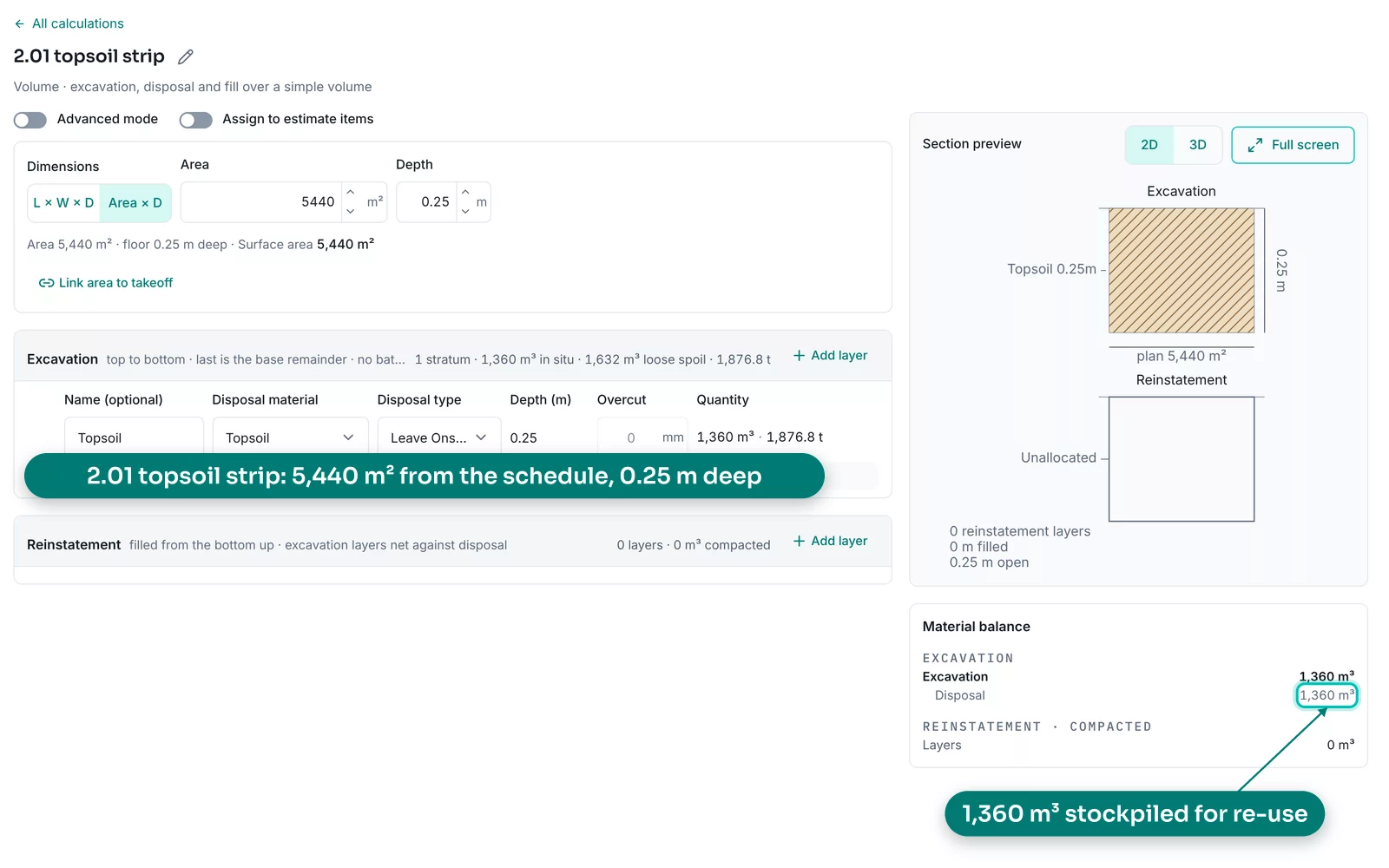
Stralos’s Volume calculator on 2.01 topsoil strip: Area × D with 5,440 m² and 0.25 m deep, and the material balance showing 1,360 m³ of excavation.
Recorded in Stralos: the Volume calculator on 2.01 topsoil strip, 5,440 m² at 0.25 m deep, 1,360 m³.
The calculators, what they work out and what they take from your takeoff
CalculatorWorks outFrom your takeoff
TrenchEach layer of ground dug and carted, bedding and backfill with the pipe or structure netted out, and the pipe run lengthThe trench length
Pit / StructuresA rectangular or circular pit around one or more structures, and the reinstatement around themThe length of a rectangular pit
VolumeStrips, pads and bulk digs, by length × width × depth or area × depthThe length, or the area

Where do the lengths and areas come from?

Your takeoff. Link a calculator’s length or area to a measurement’s total, or a length to one or more tag subtotals, and it follows the measurement. Riverbend’s 180 m trench is the Carriageway subtotal of the DN300 run, so if the run is re-measured, the trench, its quantities and their costs follow.

  • The trench length, a rectangular pit’s length, and a Volume calculator’s length or area can each be linked.
  • Link a Volume area to one takeoff area and the batters follow the outline you drew, not a rectangle.
  • On an item measured in m², the Volume calculator starts from the item’s own quantity, so you only enter the depth.
  • In takeoff, a measurement’s uses count opens its Trail: every item, calculator and cost line it feeds, down to the price.

How do the quantities get priced?

Each layer lands in the item’s costs as its own line, ready for a rate from your rate library: excavation, cart-away, bedding, backfill and reinstatement. Change the dig later and the quantities update, while the rates you chose stay as they were.

  • Pick a bulk material for a layer and its volume becomes tonnes to buy, using its compaction and the supplier’s density. Where suppliers’ densities differ, you see the range.
  • Ground you cart away takes a disposal rate from your own list. Ground you keep on site can go back in as backfill.
  • Split an excavated layer across more than one item by percentage.
  • Price readings such as the saw-cut length, the asphalt’s top area or the pipe run length from a rate, with pipe in whole stock lengths.

Worked example: what does the Trench calculator work out?

Riverbend’s DN300 road trench is 180 m long, 0.75 m wide and averaging 1.05 m deep from subgrade, in sandy gravel. That’s 141.75 m³ in the ground. At 15% bulking it’s 163.01 m³ on the truck, and at 1.7 t per loose cubic metre, 277.12 t to cart away.

  • Each layer of ground takes its own bulking and density, so topsoil and gravel aren’t lumped together.
  • Battered sides and overcut are inputs: per side, as an angle, or as a ratio.

Worked example: bedding, backfill and the pipe

Reinstatement goes in from the trench floor up. On Riverbend the AP20 bedding, haunch and surround is 0.619 m deep, less the 19.25 m³ the pipe takes up, leaving 64.32 m³. Above it, 0.431 m of AP65 backfill is 58.19 m³.

  • Enter the pipe’s outside diameter, not the DN. The example’s DN300 RCRRJ is 369 mm outside. Use your supplier’s table.
  • Backfilling with what you dug? Choose the layer it comes from and that volume comes off the cart-away.

Questions

How do you calculate trench excavation volume?

Length by width by average depth gives the volume in the ground. Riverbend’s road trench averages 1.05 m deep from subgrade: 180 × 0.75 × 1.05 = 141.75 m³. Multiply by one plus the bulking factor for the loose volume (× 1.15 = 163.01 m³), then by loose density for tonnes (× 1.7 = 277.12 t). Stralos does this for each layer of ground.

What bulking factor does it use?

Yours. Each excavated material in your company’s list carries its own bulking percentage and loose density, so the numbers match the ground you dig. On the example job, Riverbend’s sandy gravel is set at 15% and 1.7 t/m³.

Can I set it up to my council’s trench standard?

You enter the widths, bedding and backfill your specification calls for, then save that set-up to your Calculator Library. The next job to the same standard starts from it.

Are the calculators in the Lite plan?

Yes. The calculators, the 3D view and the Calculator Library are on every plan, including free Starter.

Start free on your next tender

Set up your company in a few minutes and price a real job on Starter, with no card and no time limit.

Free on Starter: everything in Standard for one person, with up to 5 active projects and 2 AI reviews a month. No card. When you add people or go past 5 active projects, Standard is NZ$199 per user per month + GST. Lite, for quotes, is NZ$99 + GST.

Start free on your next tender

Start free on your next tender

Free on Starter: everything in Standard for one person, with up to 5 active projects and 2 AI reviews a month. No card. When you add people or go past 5 active projects, Standard is NZ$199 per user per month + GST. Lite, for quotes, is NZ$99 + GST.

Request a callback

Leave your number and one of us will ring you within one working day. If you’d like, we’ll show you Stralos on a job like yours while we’re on the call.

We’ll use these details to call you back and follow up afterwards. See our privacy policy.