
Industries
Earthworks estimating software for earthmoving contractors
Stralos is earthworks estimating software for earthmoving and civil contractors pricing topsoil strips, bulk cut, imported fill and building platforms. Measure the areas on the drawing or an aerial map, enter the depths, and the Volume calculator works out each layer in the ground, on the truck and in tonnes, priced from your plant, trucks and tip rates.
Free on Starter: everything in Standard for one person, with up to 5 active projects and 2 AI reviews a month. No card. When you add people or go past 5 active projects, Standard is NZ$199 per user per month + GST. Lite, for quotes, is NZ$99 + GST.
What makes earthworks hard to price?
-
Bank, loose and compacted are three different numbers.
The schedule pays in cubic metres in the ground. The trucks carry loose ones, the tip charges by the tonne, and fill goes back compacted. Topsoil, clay and rock each bulk differently, so one factor for the whole site misprices the cart-away.
-
Where the spoil goes sets the price.
Cleanfill, managed fill and landfill each charge differently, and the waste disposal levy is set per tonne by class of disposal facility. It rose on 1 July 2026 and is set to rise again on 1 July 2027.
-
Fill under a building has to be certified.
NZS 4431:2022 covers engineered fill for lightweight buildings. A geotechnical designer writes the earthworks specification and a certifier confirms the fill was built to it, so the testing and the certifier’s time belong in your price.
-
Haulage is hours, not kilometres.
A truck’s day depends on the load, the haul and the wait at the tip. Price too few truck hours and the job runs out of trucks; too many and the price loses the job.
One job, priced in Stralos: Riverbend Stage 3’s earthworks
Example job and company: Riverbend Stage 3, a 28-lot subdivision in Selwyn District for Kahu Plains Land Ltd, priced by the fictional Kesterton Civil Ltd. Section 2 of the client’s schedule is the earthworks: topsoil strip, road boxing, a stormwater basin, berm fill and respread.
-
Measure the areas.
Take off each area on the drawing, or on LINZ aerial or Google Maps satellite when there’s no drawing yet: the road reserve to strip, the basin, the berms to fill. Tag each one and it keeps its own subtotal, ready to become its own item.

Recorded in Stralos: Cathedral Square, Christchurch, on LINZ aerial with property boundaries and the council’s pipes. A different site from the example job.Aerial imagery and property boundaries: Toitū Te Whenua LINZ, CC BY 4.0. Pipe data: Canterbury Maps and partners, CC BY 4.0. -
Work out each dig in the Volume calculator.
Item 2.01 strips topsoil over 5,440 m² at 0.25 m: 1,360 m³, with the area typed from the schedule. Enter an area and a depth, or a length, width and depth. Link the area to a takeoff area instead and the batters run around the outline you drew, so a basin with 1V:4H sides is worked out around its real shape.
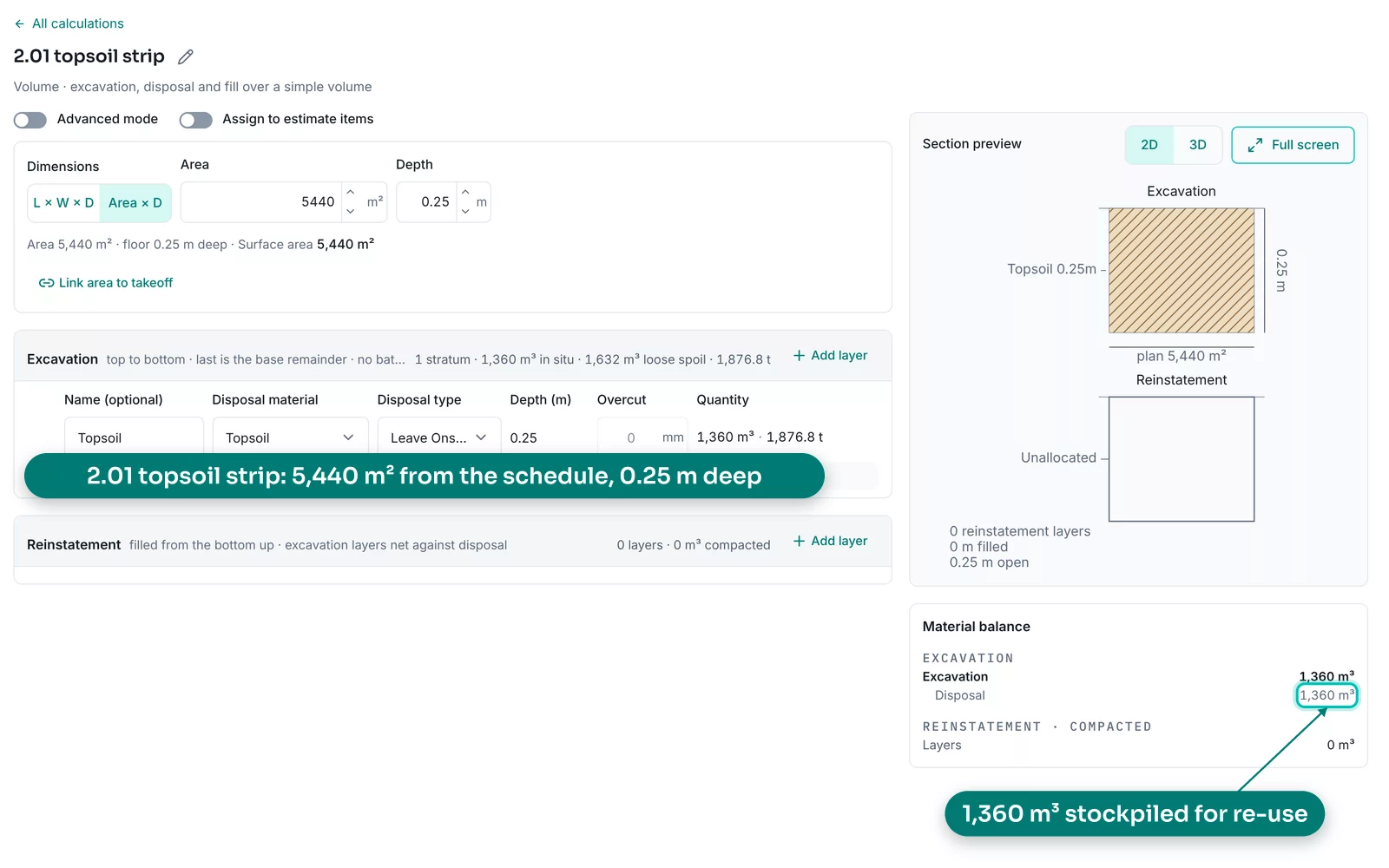
The Volume calculator: 2.01 topsoil strip, 5,440 m² at 0.25 m deep, 1,360 m³. Example job. -
Bulking, tonnes and where it goes.
Describe the ground as layers, each one an excavated material from your company’s list, which starts with 12 of them, from topsoil and clay to hard rock, asphalt and concrete, each with its loose density and bulking. Each layer stays on site for backfill or is carted to a disposal rate you choose, and the cart-away comes out in loose m³ and tonnes.
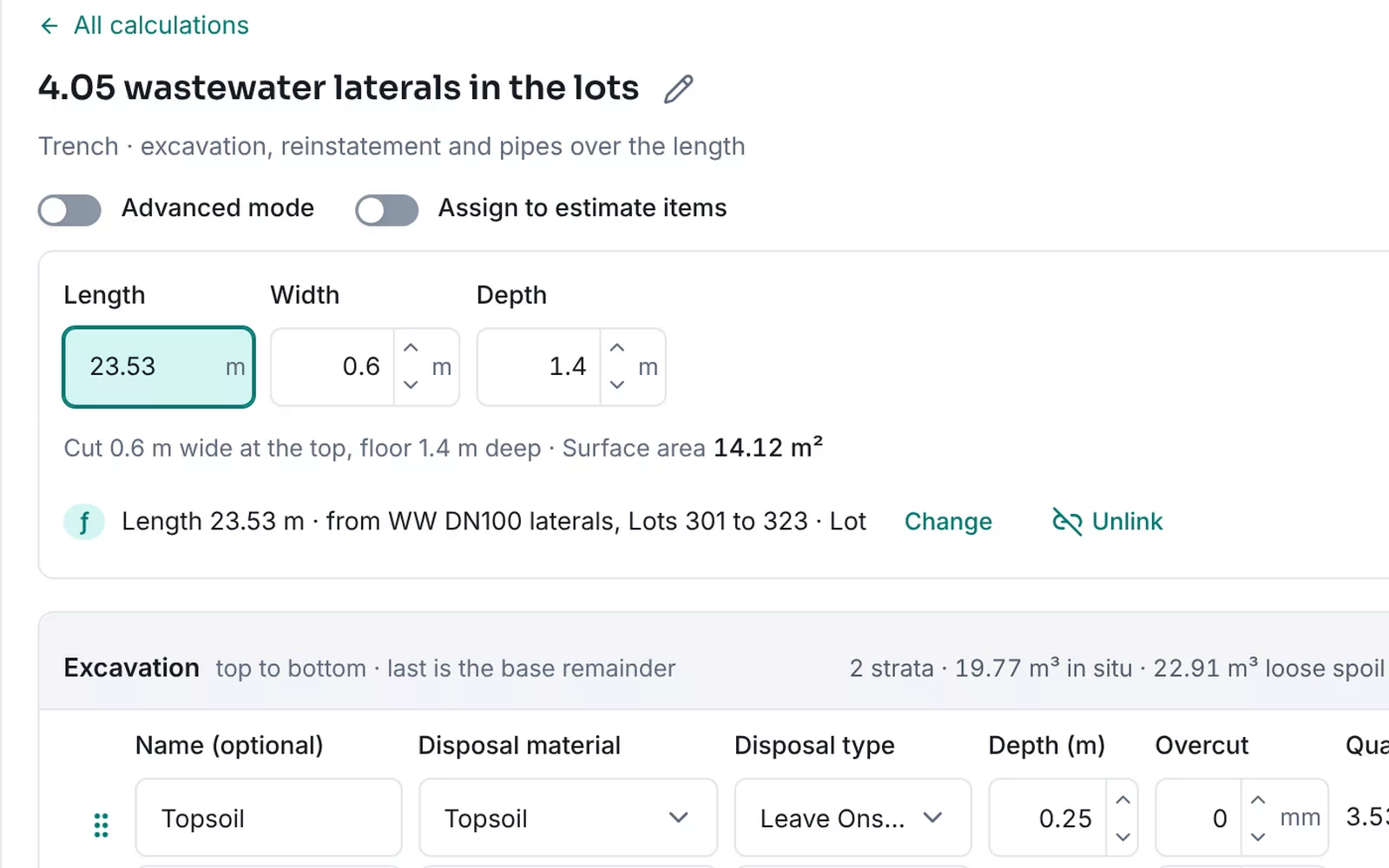
Recorded in Stralos: the same layers in a trench on the example job: topsoil and gravel reused, the surplus carted, then the trench in 3D. Example job. -
Price the plant and trucks.
Each item’s costs are your own excavators, dozers, rollers and trucks from your rate library, with a production rate in m³ a day, a week or a month. The days and hours follow from the quantity. Trucks carry a payload in tonnes and a bin volume in m³. Save the activity to your library with one production rate for clay and one for rock, and pick one next time.
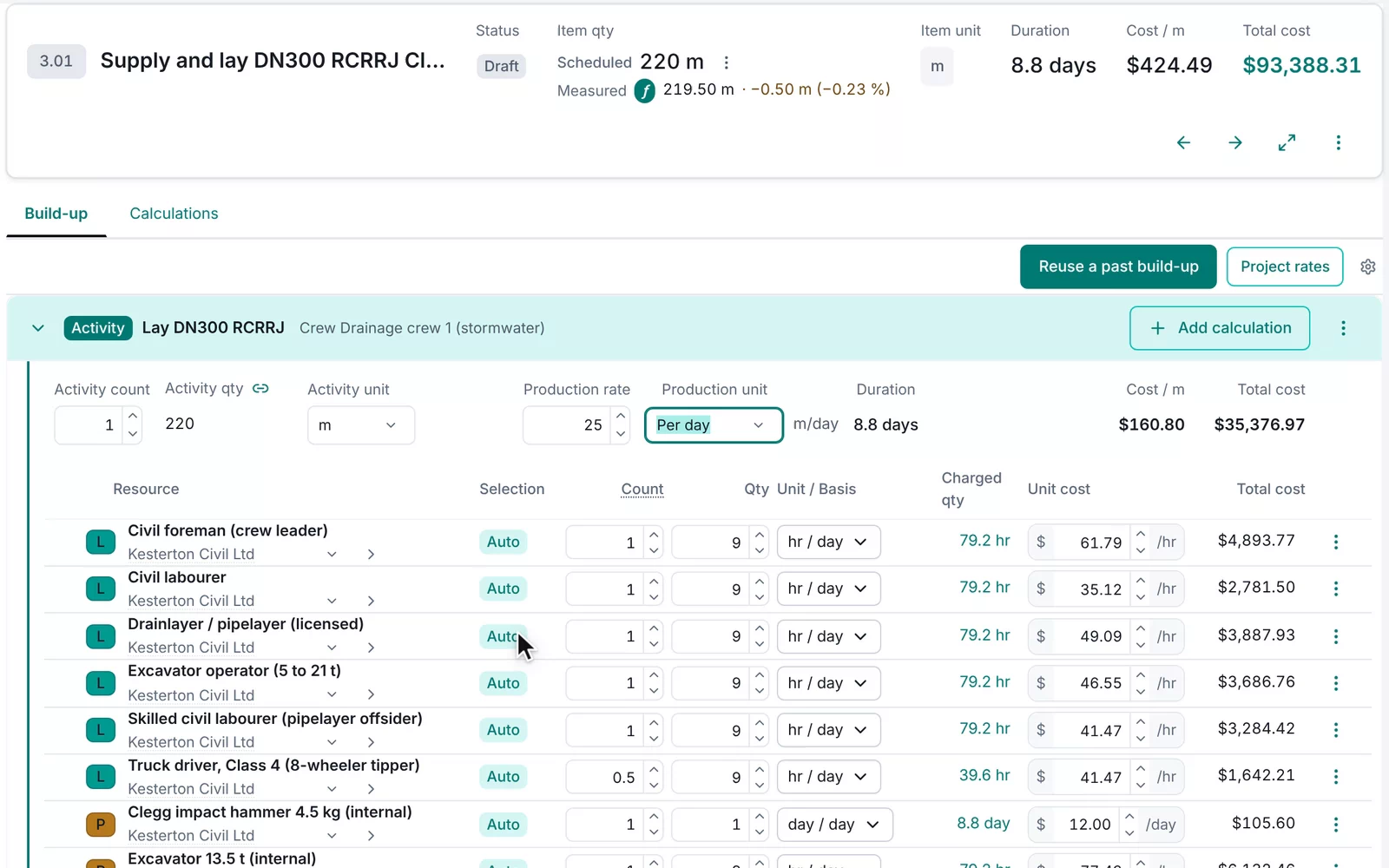
Recorded in Stralos: a production rate changing on the example job’s stormwater pipe, and the days, hours and cost per unit following. Example job and rates. -
Imported fill and the tip, by road.
Every supplier site and tip in your library is measured by road from the job, with drive time, so you see where the hardfill comes from and the cleanfill goes. Always use the supplier you prefer, or pick the cheapest within the distance you set. Cartage is its own line. On a Tender job, the Overview ranks your supplier sites by road distance.
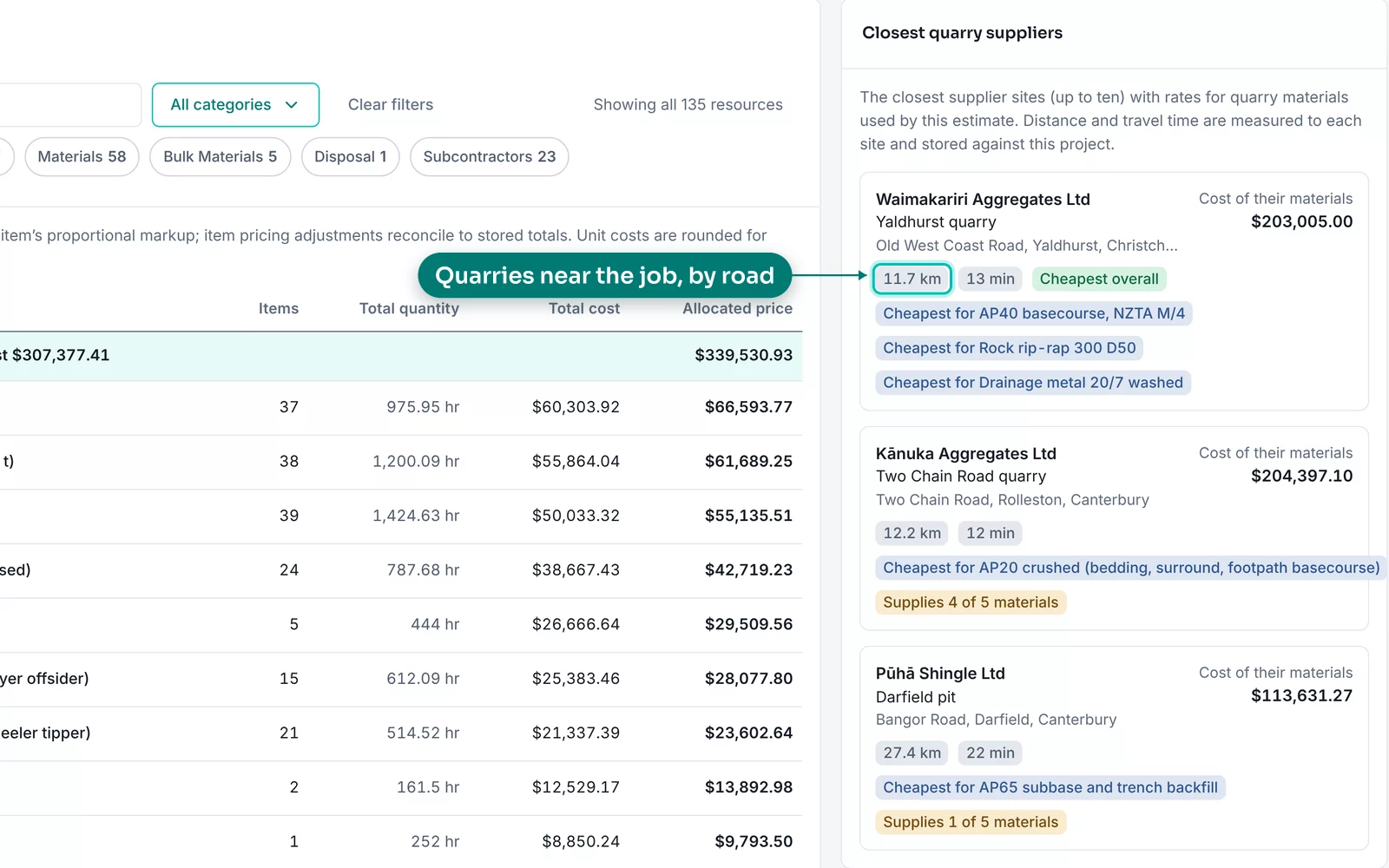
Your closest quarry supplier sites by road, with drive time and what each would cost on this job. Example suppliers and prices. -
Check the truck hours, then send it.
Before it goes, Tender review flags truck hours more than 25% short of, or over, what the material you’re moving needs, and material moved with no truck priced anywhere. Then the client’s own workbook goes back priced. (On Standard, and free on Starter.)
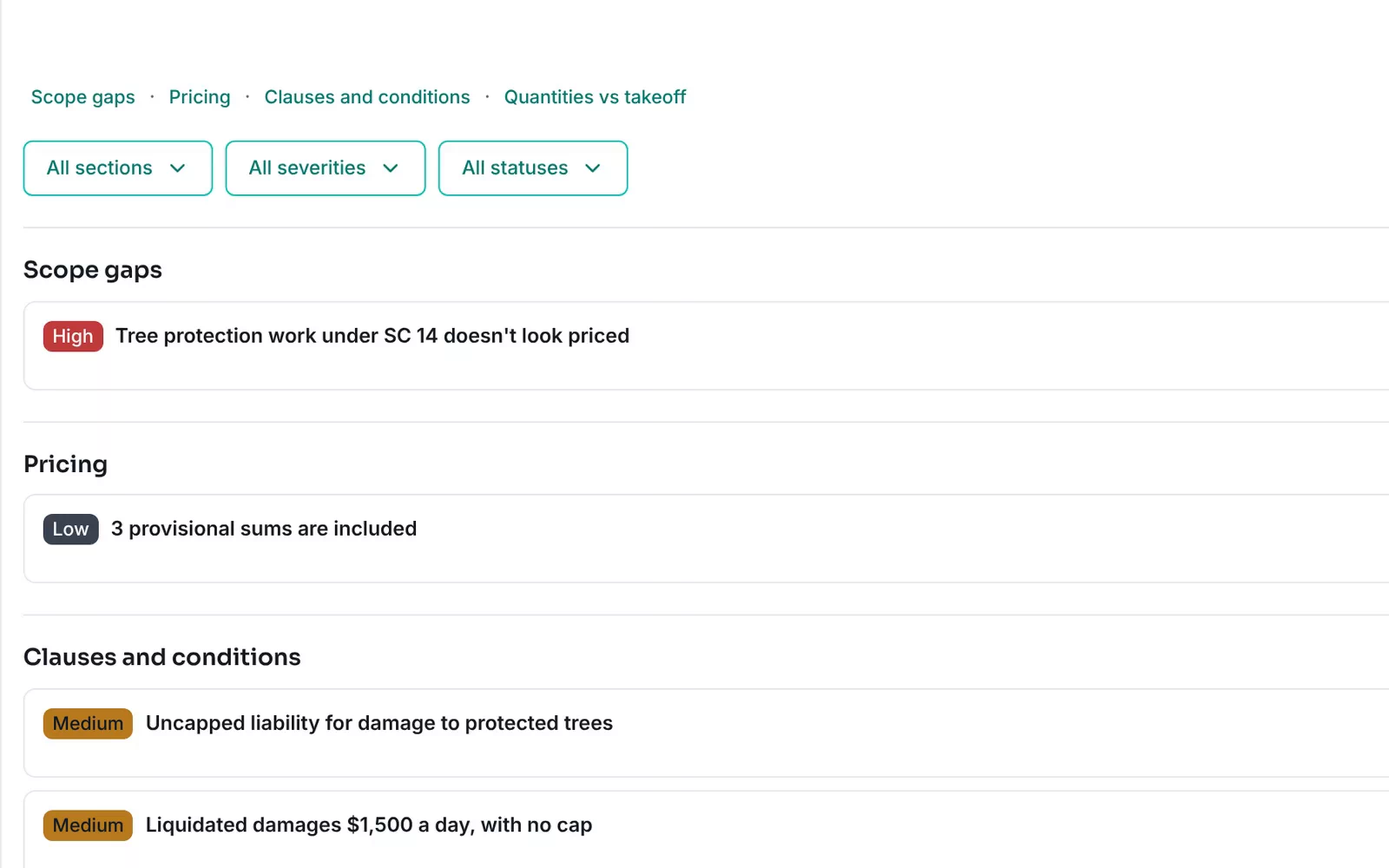
Recorded in Stralos: the tender review’s findings on the example job, then a quantity checked against the takeoff. Example job.
Riverbend’s topsoil, by hand. The schedule strips 250 mm and spreads 100 mm back on the berms and basin. What’s left goes to the Stage 4 stockpile, and how much that is depends on the bulking and compaction you set for the topsoil.
Worked example, not a recording
| Area | Depth | Works out at | |
|---|---|---|---|
| 2.01 Strip topsoil | 5,440 m² | 0.25 m | 1,360 m³ in the ground |
| 2.05 Respread on berms and basin | 2,590 m² | 0.10 m | 259 m³ spread |
What Stralos doesn’t do. It doesn’t work out cut and fill between existing and design surfaces, and it doesn’t read LandXML or 12d models. Bring the cut and fill volumes from your engineer’s or surveyor’s model and price them in Stralos, or work them out by area and depth.
What you start with
Sign up as “Earthworks” and your rate library starts with 17 categories, among them Excavators, Bulldozers, Rollers, Trucks & tippers, Topsoil, Hardfill, Cleanfill and Green waste. Your takeoff starts with Cut to Fill, Cut to Waste, Imported Fill, Topsoil Strip, Trenching and Erosion & Sediment Control. It holds your own rates and your suppliers’ price lists. Ask us and we’ll load your price list into your rate library for you.
Questions
Can Stralos work out earthworks volumes?
Yes, by area and depth or by length, width and depth, with batters, layers of ground, and what stays on site or gets carted. It doesn’t work out cut and fill between surfaces: bring those volumes from the design model.
How does it handle bulking and compaction?
Each excavated material in your company’s list carries its own loose density and bulking, and a compaction figure where it can go back in as fill. Change them to suit the ground you dig.
Can I price earthworks per m³?
Yes. Set the production rate in m³ a day, a week or a month, and the days, the hours and the cost per m³ follow from your own plant and crew.
Can I quote a small earthworks job with no schedule?
Yes. Choose a quote when you set up the job and price each part as a line, on Lite or Standard. Lite takes up to 10 priced lines a quote.
Does it know which tip is closest?
If the tip is in your library. Stralos measures the road distance from the job to each site you’ve loaded, tips and quarries included, and prices from the supplier you prefer, or the cheapest within the distance you set.
Last reviewed
Price your next earthworks job in Stralos.
Free on Starter: everything in Standard for one person, with up to 5 active projects and 2 AI reviews a month. No card. When you add people or go past 5 active projects, Standard is NZ$199 per user per month + GST. Lite, for quotes, is NZ$99 + GST.